

Setting the Record Straight: What Those “Digify Review Sites” Got Wrong
Not all Digify reviews tell the full story. Get the real facts on Digify’s pricing, security, integrations, and support—straight from the source.

How secure is your data really? When you send a PDF file, how do you know the file is secure? This is where password protection is often one of the first things people think of when considering “document security.”
How secure is your data really? When you send a PDF file, how do you know the file is secure?
Password protection is often one of the first things that comes to mind when considering “document security.” Protecting a PDF file with a password is an easy way to ensure that a sent file is protected.
Password protection is not perfect. It is only the most basic level of PDF protection. This level of protection does not prevent people from sharing their password, or passing on the document together with the password in an online forum. Some companies even completely nullify their use of password protection by sending the document and the password to access it in the same email!
Password protection on its own doesn’t allow you to track the document or to see who has opened it. If the content is open to being copied, there is nothing to prevent the recipient from doing so and spreading the information elsewhere. This is why one of our recommendations is that you use password protection along with other security means, such as preventing copying and printing, and tracking your document.
You can easily add a password to PDF documents yourself, of course bearing in mind the limitations we have just outlined. Let’s look at the various methods to password protect your PDF.
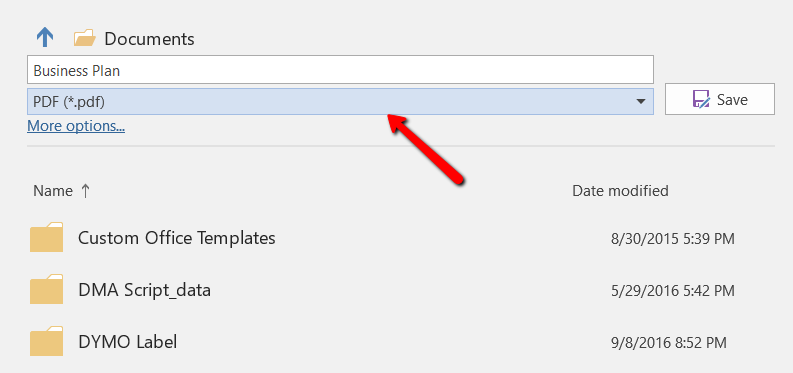
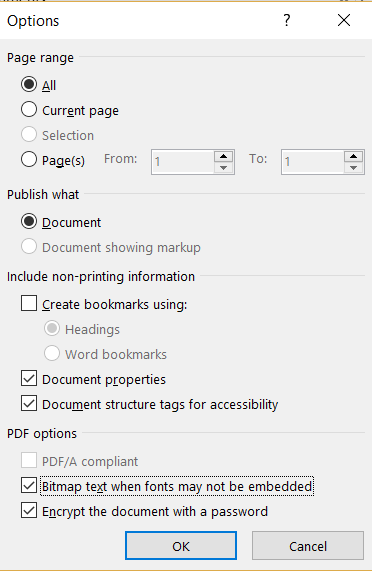
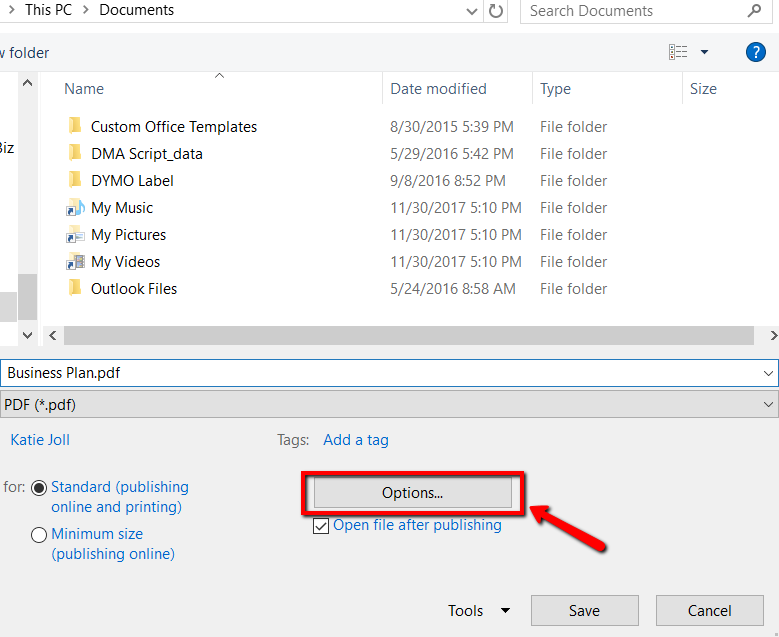
Many PDF files begin life as a Word document so it makes sense to be able to encrypt them through the program. You would need to take the following steps on a PC:


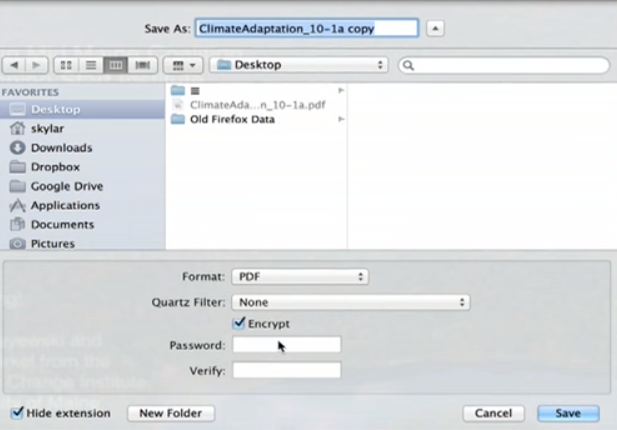
A Mac allows you to set a password using the native, Mac OS through the “Preview” program. Here’s how it works:
NOTE: If you have a PDF file in Google Docs, you can follow this same method on a Mac after saving a copy to your desktop to work from.

Password protection is a simple solution, but it is far from ideal. You may have put a small barrier in place to view your document, but you do not know who has seen it, for how long or how many times they’ve accessed it.
The key problem here is that a password is not tied to the identity of the person viewing the file. There is one password for the file and it can simply be passed on to others together with the file, and you will be none the wiser. There is also no way to revoke the file or take it back if you’re using free encryption methods such as via Word.
Another important consideration is, although the file is password protected, the contents of the file can still be copied and pasted into another file after it is opened.
Digify offers a better alternative rather than simply putting a password or passkey on a file. With Digify, the file can be encrypted using a highly secure AES-256 algorithm using your password. Digify can also protect multiple file formats other than PDF.
While password protection is available as a feature within Digify, there are other options available too, for instance restricting access to only people you invite. This is more secure than just a password on the file, as it is tied to the identity of the person. They would need to validate their identity with a one-time code before they are allowed access to the file.
Digify’s features allow you greater control over the files you send:
You can test these features out for yourself with a free 7 day trial of Digify. Sign up here to get started.

Author
Marketing specialist focused on turning insights into measurable business impact.
Not all Digify reviews tell the full story. Get the real facts on Digify’s pricing, security, integrations, and support—straight from the source.

Planning your intellectual property protection strategy is essential to prevent IP leaks.
Remote learning resources such as Digify document security and Splashtop remote access can help solve today’s online education challenges.